Expresii 寫意
  • Home
  • Showcase
    • Moxi Paint Engine
    • Yibi Brush Engine
    • A New Way to Paint
    • youji Rendering Engine
  • Download
    • Get / Buy Expresii >
      • Update Log
    • Sample Artwork Files
    • Third-Party
  • Support
    • Documentation >
      • End User License Agreement
      • Privacy Policy
    • Video Tutorials
    • User Forum
    • FAQ
    • Feedback
    • Help Translate
  • About Us
    • Contact Us
    • Media Resources
    • Privacy
  • Blog
  • 主頁
  • 示範
  • 網誌
  • 下載
  • 關於我們
    • 聯絡我們

Using Gamer Controller with Expresii for Tilt control

1/9/2016

Comments

 
Picture
We cannot emphasize  enough  the importance of stylus tilt sensing.   If your graphics tablet  doesn't sense tilt, apart from using right-mouse-button-drag, you can still choose to add a game controller in the mix - a cheap one can be had for under US$10.  

In our demo, we use a PS3 controller, because it's also equipped with a tilt sensor that can be used for paper tilt in Expresii.

Since the P3 controller is not native to the Windows OS, we need some third-party software to make it work on the PC: MotionInJoy driver, Better DS3. You first install the MotionInJoy driver, which also comes with its own control mapping tool, but it's better to use the Better DS3 tool for easier mapping.

If your game controller is native to PC, you probably can simply plug and play.

To test the game controller we use Joystick Tester . We map the controller tilt to  R and U values as shown in the  Joystick Tester . 

The following is video showing how it works together:

The non-tilt-sensing graphics tablet used was a  Huion H420 (US$30). Its three buttons on the panel itself can be mapped to hotkeys  of your choice.  It's cheap  and good, except that  the battery compartment  gets rusty and gives bad contact  now. We have had it for one year only. Another downside is that the hover distance is very little compared to that of a Wacom.   But for $30, it's not bad an option for those who on a budget or want a very portable graphics tablet - it's probably the smallest graphics tablet that gives pressure reading!
Picture
And in case you also own a PS3 controller, here is the mapping we use.  You can first press the 'Auto Fill' button to get  a default mapping, and then modify it from there. It's  mainly the SixAxis Tilt that needs to be assigned as Right Stick (X, Y).
Picture
Comments

CES Asia 2016 & Wacom Connected Ink Shanghai

16/5/2016

Comments


CES (Consumer Electronics Show) Asia 

​Recently   we've been working closely with Wacom  and our latest  show was at  CES Asia held last week in Shanghai, China.  This is the second year we have CES  Asia   in addition to the CES in the US.
Wacom is  promoting  their  Pen ID  feature and  Expresii was used  to  show off  that. Essentially, Pen ID allows you to associate  your  brush  settings  to  a particular  physical     pen so that  you can simply switch the physical pen  when you want to switch   your virtual tool .  Here is a demo:
One of the  tablet models  we used was the HP Elite X2,  among   others  from Toshiba  and Lenovo.  Check out the following  amazing  flow  demos in which the HP  wa s  used .  

Wacom's Connected Ink

Our Dr.  Nelson Chu was  also invited to be a  Panelist  at  Wacom's  event  Connected Ink   to discuss the future of digital ink.  It's  held on the  93rd  floor  of  Shanghai World  Financial Center  ,  one  of the world's tallest buildings  during the second day of CES Asia.
Expresii  attracted many of the participants, including both hardware and software makers.  The flowing ink, which you can control by tilting the tablet itself,  is simply amazing. 
During the discussion,     Nelson mentioned  that  this is the right time  for digital ink to  get  even  more popular:
For our case, we used to require a discrete GPU (Graphical Processing Unit) for fast fluid simulation, but now even a mobile device can do the job fast and cool!  
Advanced  tech   is  becoming  more accessible: 
In the past, we had to tell artists to upgrade their graphics cards and not many of them know what to do. Now they can simply buy a new Windows tablet and enjoy our flowing ink and more! ​
Impact on ​ creativity:
Other painting apps' watercolor do not really flow in a natural way. Expresii is different - its flow is lifelike and really organic. The resulting patterns are intriguing and often spark imagination.
Wacom has been  pushing  forward   the  Digital Stationery Consortium    as a joint movement around “ink of 21st century”.   We   are totally   aligned  with      this  development.  In East Asia,  we have been using a writing brush to write  for thousands of years.  Today   calligraphy is a still   big part in our lives.  The following is  a piece of calligraphy '文房具‘   meaning ’ Stationery‘ in Japanese  (yes, those are actually Chinese characters ;-)  done with Expresii  .  Notice the high quality rendering that other apps just can't match.
Expresii is the best tool I've ever used for calligraphy and ink painting! - Nobutaka Ide, Sr Vice President, Wacom
In deed,   the strokes and  flows in Expresii  are so natural,  people seeing it for the first time are  often  in awe.   In conclusion,  now hardware and software are finally  coming together  to make  advanced  creative tool like Expresii  easily  accessible!  ​

Picture
Our Nelson Chu with Mr. Masahiko Yamada, President & CEO of Wacom, Mr. Nobutaka Ide, Sr. Vice President of Wacom, and Mr. Martin Sun, Wacom Taiwan President and other colleagues.
Comments

Using Smart device as Stylus Tilt Controller 以智能裝置控制畫筆傾斜

25/1/2016

Comments

 
We think stylus tilt is really important in using paint programs like Expresii.  Unfortunately,  today most Windows tablet, including Microsoft's latest Surface Book and Surface Pro 4,  do not support stylus tilt (Apple's iPad   Pro  does!). To remedy this, we explore    using a smart device as a stylus tilt controller .
Picture
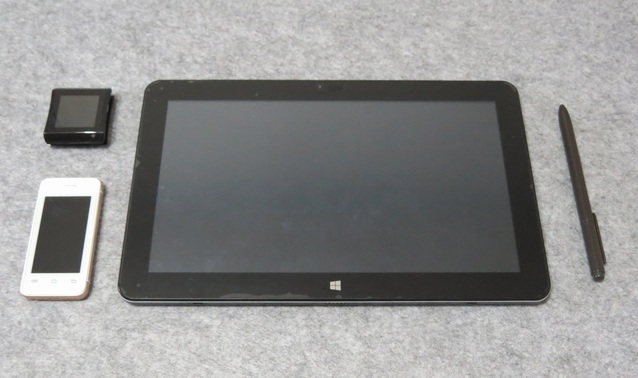
Using smartwatch and smartphone (left) with Windows tablet to give stylus tilt control.
In doing so, we acquired   the  world's smallest android  smart  phone Melrose S9   (US$58  here), and an android  4.4  smartwatch HOPU  EC720    (US$105)  and here is the result:
The smart device is connected to the  Windows tablet via WIFI  (a little jerky in the video, but that's because we moved to a place a little far from the WIFI  spot  for filming).  It's possible to attach a small smart device to the stylus itself (right) to make it a little more intuitive, but frankly  it's still  not  an  ideal solution. In conclusion,  we really wish    that  more  Windows tablet makers  would   add native stylus tilt support so that we don't need to find another solution. ^_^

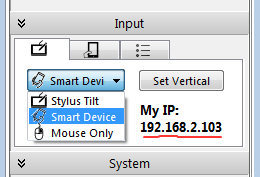
To  try  our tilt solution,    all you need is an android device that runs this app called  Sensor stream IMU+GPS. In the  app, leave port as 5555, select 'UDP Stream',  and enter  the IP address  that you see when you select in Expresii's App Menu->Input->Brush  Tilt->Smart Device (see right).  The smart device and your  Windows tablet  must be on the same WIFI network. Your Expresii version must be at least  since 2016-01-31. Let us know how you like it by leaving a comment below  or  say  in our Facebook page!  

BTW, the tabletPC used here  is   the Cube i7 stylus (~US$350), which you can buy  from various online  agents like   GearBest   or  Banggood.
Picture
Expresii shows the IP address of your PC needed by the Android app.
Comments

Running on a Mac via Parallels Desktop 8 在Mac上運行

7/7/2013

Comments

 
Picture
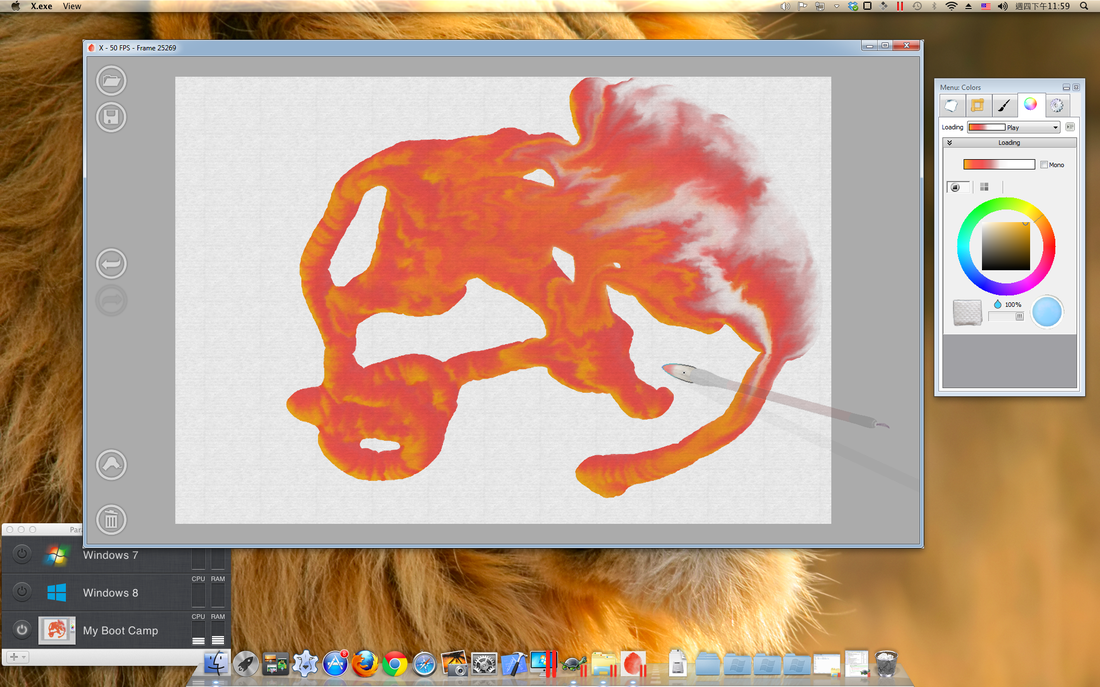
Expresii running on a Mac Mini 2011 with GPU 6630M, Mac OS X 10.7.3 (Lion) via Parallels Desktop 8.
Yes, it is possible to run Expresii on a Mac via Parallels Desktop. However, in our test case, it's about 25% slower than running on Boot Camp.

FYI, Wacom tablet doesn't work out-of-the-box under Parallels, but it's possible to fix it. Due to these limitations, we recommend running Expresii on Boot Camp so that you get the performance your hardware is capable of. However, if your machine is  a very fast one like the Mac Pro 2012, it's probably okay to have the 25% performance hit.

Expresii 兼容 Parallels Desktop,但我們建議使用Boot Camp 來跑Expresii,因為測試中用Parallels Desktop會比Boot Camp慢約25%,而且wacom 繪圖板不能用到壓力和斜度感應(有補救方法)。如果您的電腦本身很快(如Mac Pro 2012),那慢25%應該還跑得順吧。

2020 Update :   Running via Parallels Desktop 15 or later
Comments
Forward>>

    Expresii 寫意

    Previous Posts
    以前的文章

    December 2025
    October 2025
    September 2025
    May 2025
    December 2024
    November 2024
    September 2024
    June 2024
    May 2024
    November 2023
    August 2023
    July 2023
    June 2023
    January 2023
    November 2022
    October 2021
    July 2021
    June 2021
    May 2021
    April 2021
    March 2021
    February 2021
    December 2020
    November 2020
    October 2020
    August 2020
    June 2020
    April 2020
    January 2020
    December 2019
    November 2019
    October 2019
    September 2019
    August 2019
    July 2019
    May 2019
    April 2019
    March 2019
    February 2019
    January 2019
    December 2018
    November 2018
    September 2018
    July 2018
    June 2018
    April 2018
    March 2018
    February 2018
    January 2018
    December 2017
    October 2017
    August 2017
    July 2017
    June 2017
    May 2017
    April 2017
    February 2017
    January 2017
    December 2016
    November 2016
    October 2016
    September 2016
    July 2016
    June 2016
    May 2016
    April 2016
    March 2016
    February 2016
    January 2016
    December 2015
    October 2015
    September 2015
    August 2015
    July 2015
    June 2015
    March 2015
    February 2015
    January 2015
    December 2014
    November 2014
    October 2014
    September 2014
    August 2014
    July 2014
    June 2014
    April 2014
    November 2013
    October 2013
    July 2013
    February 2013
    January 2013
    December 2012

    Categories 分類

    All
    3rd Party Tool
    Animated
    Artists
    Calligraphy
    Demo
    Hardware
    Mac
    New Feature
    Publicity
    Purchase
    Surface
    Tech

    RSS Feed

Picture
© Expresii.com 2012-2026. All Rights Reserved.